Explore Every Feature of HappyTrails
A comprehensive look at the tools and capabilities that make HappyTrails the most powerful AI-powered travel companion for curious explorers everywhere.


Find What's Around You Instantly
GPS-Powered Nearby Discovery
HappyTrails uses your device's location to pinpoint exactly where you are, then surfaces every notable attraction, restaurant, museum, park, cafe, and landmark within walking distance. The moment you open the app, discovery begins automatically.
- Automatic location detection with a single permission prompt when you first visit
- Finds places across a wide area so you never miss something just around the corner
- Results include full place details: name, address, rating, photos, and opening hours
- See how far away each place is, measured as the crow flies from where you stand
- Distance displayed in both the list view and on map markers for quick reference
- Re-center and search a new area as you move or pan the map
Search Any Destination Worldwide
Intelligent Place Search
Planning ahead? Search with instant suggestions to find any place on earth. Whether you type 'Eiffel Tower', 'best ramen in Osaka', or 'national parks near Denver', HappyTrails delivers accurate, relevant results instantly.
- Covers millions of places worldwide, from famous landmarks to neighborhood gems
- Instant suggestions appear as you type so you find the right place in a few keystrokes
- Results near your current location come first when you're searching on the go
- Search for specific places, types of places, or general queries like 'things to do in Rome'
- One-tap selection from a suggestion to instantly load results
- Clear search with a single tap to start fresh discoveries
See Your Discoveries Your Way
Map View and List View
Toggle between an interactive map and a scrollable list depending on your preference. On larger screens, both views appear side by side so you can browse the list while seeing locations plotted on the map. On mobile, switch between views with a single tap.
- Interactive map with custom color-coded markers for each place category
- Category-specific marker icons: restaurants, museums, parks, cafes, and more
- Tap any marker to see an info popup with the place photo, rating, type, and distance
- One-tap 'View Details' from any marker popup to open the full AI guide
- Turn-by-turn directions to any place open in your maps app
- Desktop layout shows list and map side by side for the best browsing experience
- Mobile layout lets you toggle between map and list with a single tap
- 'Search this area' button appears when you pan the map away from your last search center
Expert-Level Knowledge On Demand
AI-Generated Tour Guide
Every place in HappyTrails comes with a full AI-generated tour guide divided into six focused sections. From historical background and architectural significance to local dining recommendations and insider tips, the AI guide gives you the depth of a professional tour guide without the cost.
- Six distinct guide sections per place: Overview, History, Architecture, Culture, Food, and Tips
- Written in a warm, conversational tone suitable for voice narration
- Thoughtfully written content that's accurate, engaging, and easy to follow
- A quick summary for each place gives you the gist before you dive deeper
- Come back to a place you've explored and your guide is ready right away
- Loads instantly on repeat visits with no waiting around
- Each section is concise and voice-over-friendly, designed to be listened to while walking
Listen While You Explore
Text-to-Speech Audio Narration
Every guide section includes a prominent Listen button that reads the text aloud in clear, natural speech. Put your phone in your pocket and let HappyTrails narrate the history, culture, and stories of the places around you. Once you've heard a section, it plays back instantly the next time.
- One-tap audio playback at the top of each guide section
- Clear, natural-sounding narration that's easy to listen to
- Plays back instantly the next time you listen, even on a slow connection
- No extra data used to replay audio you've already heard
- Designed for hands-free use so you can keep your eyes on the sights
- Clear playback controls for easy start and stop
Organize Your Whole Trip Day by Day
Trip Planning & Itineraries
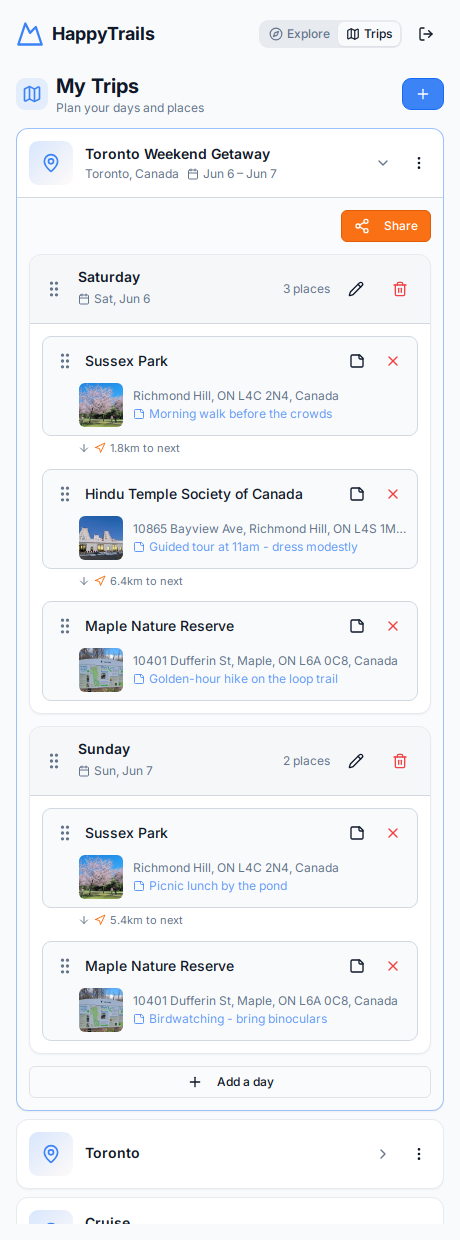
Turn the places you discover into a structured itinerary. Create a trip, break it into days, and add stops to each day in the order you'll visit them. Reorder stops with drag-and-drop, move places between days, and add a personal note to any stop so you never forget that reservation time or must-try dish.
- Create multiple trips with a destination, optional date range, and custom day labels
- Organize each trip into days and add as many stops per day as you like
- Drag-and-drop to reorder stops within a day or move them between days
- Add and edit personal notes on any stop in your itinerary
- Set your hotel as the trip's stay location and see each stop's distance from your stay
- See the distance between each consecutive stop so your route makes sense
- Every stop has its own Directions link, starting from the previous stop or your hotel
- One-tap 'Directions for the whole day' opens a multi-stop route in your maps app
A Day-by-Day Plan in Seconds
AI Itinerary Creation
Tell HappyTrails your destination, how many days you have, and what you're into — museums, food, nature, nightlife, and more — and the AI drafts a complete day-by-day itinerary for you. Add your hotel or stay location and the plan is built around it, so every day starts and ends close to home base. You review and tweak the draft before anything is saved.
- Enter a destination, number of days, and your interests — the AI does the rest
- Optionally set your hotel or stay location and the itinerary is centered around it
- Steer the plan with pace, budget, and walkability preferences — remembered for next time
- Every suggested place is matched to a real location on the map, with distance from your stay
- Preview the full draft first: edit or remove places, or regenerate a single day
- Works for new trips or inside an existing trip, adding days after your current plan
Turn Any Itinerary Text into a Real Trip
Paste-an-Itinerary Import
Already have an itinerary from ChatGPT, a travel blog, or an email? Paste the text into HappyTrails and the AI reads it, understands the days and stops, and matches every place to a real location on the map. You preview the structured trip before saving — then it behaves like any other trip you've planned.
- Paste free-form itinerary text from anywhere — no special format needed
- AI parses days, places, and notes, and matches each stop to a real map location
- Preview and adjust everything before the trip is created
- Import into a brand-new trip or append to an existing one
- Places that can't be matched are clearly flagged with a one-tap 'Find on map' fix
Walking Times, Transit, and Booking Tips
Smart Trip Enrichment
HappyTrails automatically enriches your itinerary with the practical details that make a day actually work: real walking times between consecutive stops, the nearest metro or train station for every place, and AI reservation tips for attractions and restaurants that tend to book out. It all updates automatically whenever your trip changes.
- Real walking times between consecutive stops, like '12 min walk (900 m)'
- Longer hops get a taxi hint so you know when walking isn't practical
- Each stop shows its nearest metro or train station and how far away it is
- AI reservation tips tell you when to book timed-entry tickets or dinner tables
- Tune per-trip settings: max walking distance, max walking time, and station search radius
- Everything refreshes automatically when you add, remove, or reorder places
Add Discoveries to Your Plan Instantly
Save Places to Trips
Found somewhere you love? Add it straight to a trip and day from search results, the map, or the place detail page. HappyTrails shows a clear 'Saved' indicator wherever a place already lives in one of your trips, so you always know what's already on your plan — and it stops you from adding the same place to a day twice.
- Add any place to a specific trip and day from search results, map popups, or detail pages
- A 'Saved' badge appears across the explore list, map info popups, and place detail page
- Jump straight to the trip a saved place belongs to with one tap
- Duplicate protection prevents adding the same place to a day more than once
- Confirmation prompts before removing places, days, trips, or share links
Send Your Itinerary to Anyone
Shareable Trip Links
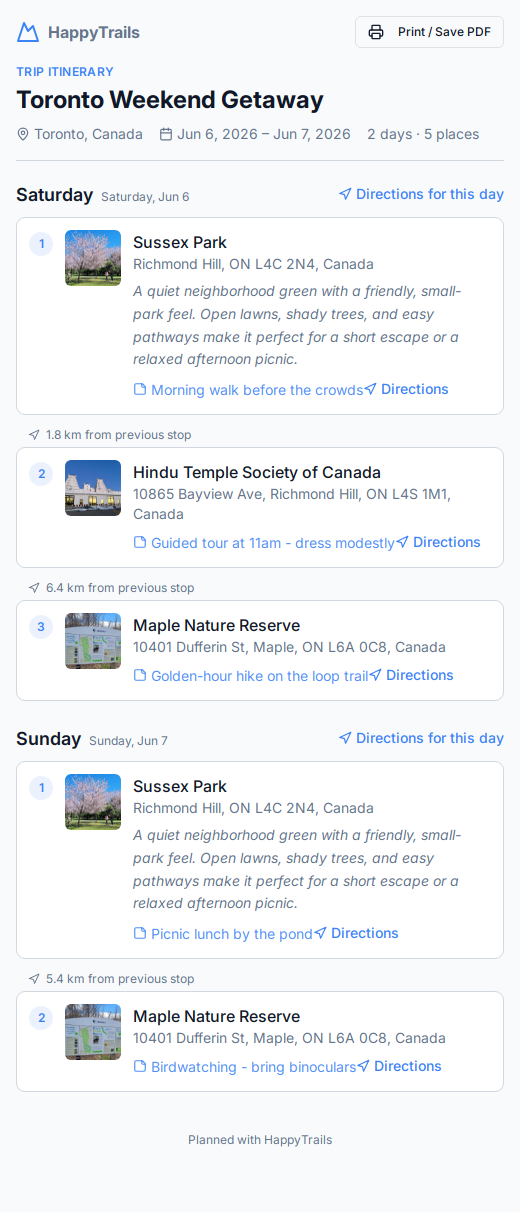
Share a complete trip with travel companions using a single public link — no account required to view it. The shared page shows each day, every stop with its photo, address, description, and your notes, plus the distance between consecutive stops. Recipients can print it or save it as a PDF for offline use, and you can revoke the link any time.
- Generate a unique public link for any trip you've planned
- Read-only itinerary view works for anyone, with no sign-in needed
- Each stop shows its photo, address, AI summary description, and your notes
- Walking times, nearest stations, and reservation tips appear on the shared page too
- Signed-in viewers can copy the whole trip into their own account with one tap
- Distance between consecutive stops shown right on the shared page
- Print or save the itinerary as a PDF with a print-optimized layout
- One-tap directions for individual stops or the whole day in your maps app
- Revoke a shared link at any time to instantly disable access
Explore Itineraries from Other Travelers
Community Trips
Why start from scratch? The Explore Trips page is a public directory of real itineraries published by other travelers. Browse, search, and sort to find a trip you love, then copy it into your own account and make it yours. When your own trip is polished, publish it for others to discover — your email is never shown.
- Browse published trips from other travelers — no account needed to look around
- Search by trip name or destination, and sort by most copied, highest rated, shortest, longest, or newest
- Copy any public trip into your account with one tap and customize it freely
- Rate public trips from 1 to 5 stars; average ratings and copy counts appear on every trip
- Publish your own trip from the Share dialog with an optional display name — and unpublish anytime
Your Trips, Safe and Recoverable
Account Security & Password Reset
Create a free account with your email and password to keep your trips synced and private. Your password is always kept private and protected, and if you ever forget it, a secure reset flow emails you a single-use link to set a new one — so you never lose access to your saved places and itineraries.
- Free account creation with email and password
- Your password is always kept private and protected — never stored as plain text
- Forgot-password flow emails a secure, single-use, time-limited reset link
- Reset page enforces strong passwords (length, uppercase, lowercase, and number)
- Stay signed in across visits so your trips are always a tap away
Find Exactly What You Want
Smart Filtering
Not interested in every result? Use the built-in filters to narrow your discoveries by place type or distance. Looking for only museums within one kilometer? Or every restaurant within walking distance? Filters give you precise control over what shows up in your results.
- Filter by place type: restaurants, museums, parks, cafes, bars, churches, and many more
- Filter by minimum and maximum distance from your current location
- Active filter count displayed on the filter toggle for quick reference
- Clear all filters with a single tap to return to full results
- Filters apply to both list view and map view simultaneously
- Type categories shown with color-coded badges for easy visual scanning
Everything You Need to Know
Rich Place Details
Tap any place to see a detailed view with high-resolution photos, address, rating, place type, and the full AI-generated tour guide. Each detail page is a complete reference for the destination, combining trustworthy place facts with rich, AI-generated storytelling.
- High-resolution place photos
- Full address with a one-tap link to open directions in your maps app
- Star rating and review count where available
- Place type badges showing all associated categories
- AI-generated summary providing a quick overview of the place
- Full six-section tour guide with audio narration for each section
Built for Travelers on the Go
Mobile-First Design
HappyTrails is designed from the ground up for mobile devices. The interface adapts seamlessly from small phone screens to tablets and desktops, and it looks great on modern phones with notches and rounded corners.
- Responsive layout optimized for phones, tablets, and desktop browsers
- Touch-friendly controls with appropriately sized tap targets
- Looks great on modern phones with notches and rounded screen corners
- No app download required — runs entirely in the browser
- Fast loading and smooth scrolling on mobile connections
- Desktop users get an enhanced side-by-side map and list layout
HappyTrails on Your Home Screen
Install as an App
HappyTrails is an installable web app: add it to your phone's home screen and it opens full-screen with its own icon, just like a native app — no app store, no download size, no updates to manage. Everything stays in sync because it's the same HappyTrails you use in the browser.
- Install to your home screen on Android and iOS in a couple of taps
- Opens full-screen with its own icon, like a native app
- No app store visit or download required — install straight from the browser
- Always up to date automatically, with nothing to manage
Start Your Next Adventure
Join HappyTrails today and transform every trip, walk, or commute into a guided exploration. Sign up in seconds and start discovering the world around you with AI-powered insights.
Create Free Account